AI that writes your Google Ads copy, correct to spec the first time.
Adgineer writes every headline and description in the client’s brand voice, inside Google’s 30/90 character limits and policy, correct on the first draft. No character-counting, no re-briefing, no rewrite before it ships.
- Every line correct to Google’s 30/90 specs
- One-click Copy for Google Ads Editor
- Nothing publishes automatically
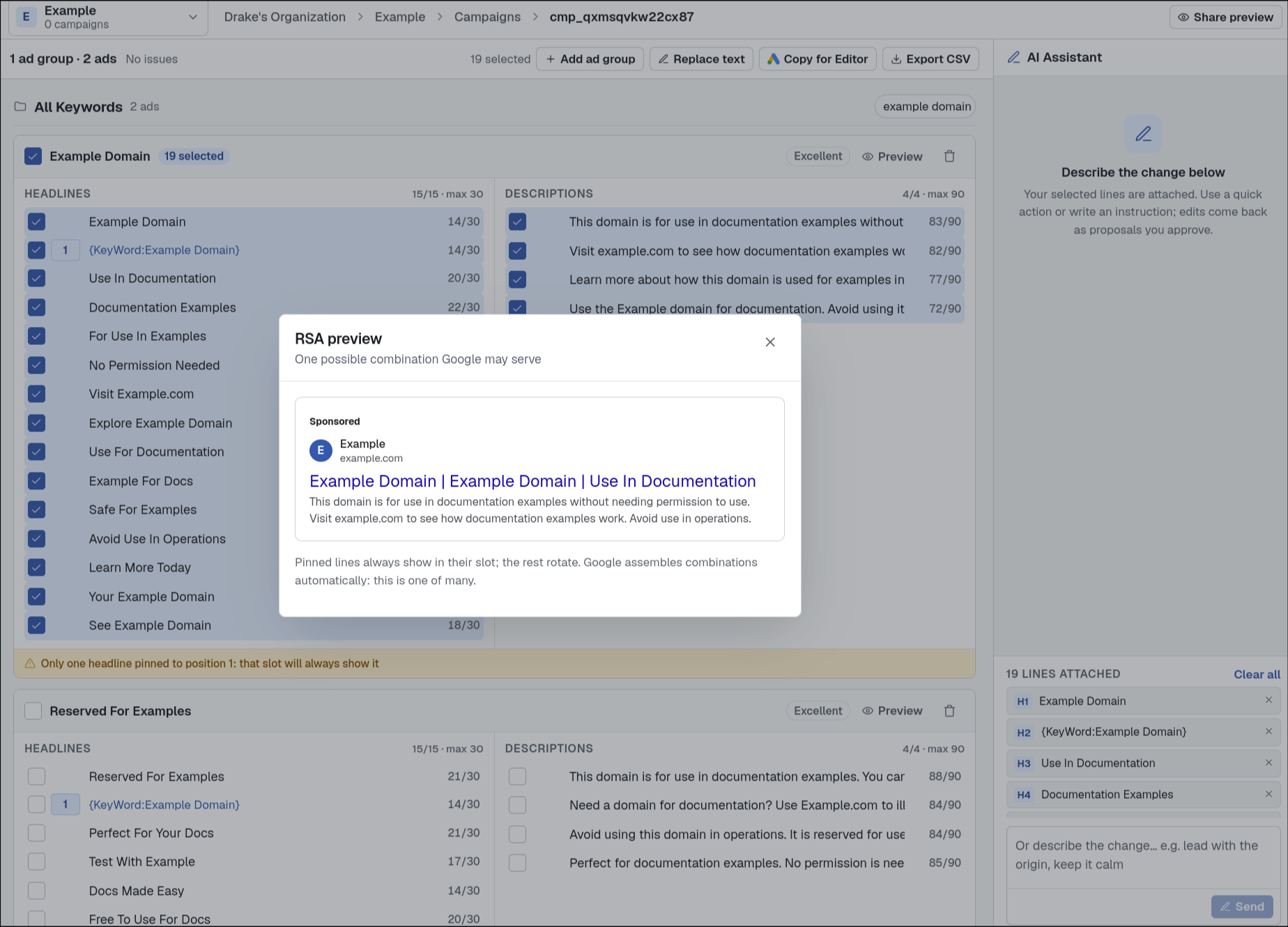
Interface optimized for speed
Stop writing ads in spreadsheets and docs. Create on-brand ads fast, edit them with find and replace, bulk-refine only the copy you select, then export a CSV or paste into Google Ads Editor in two clicks.
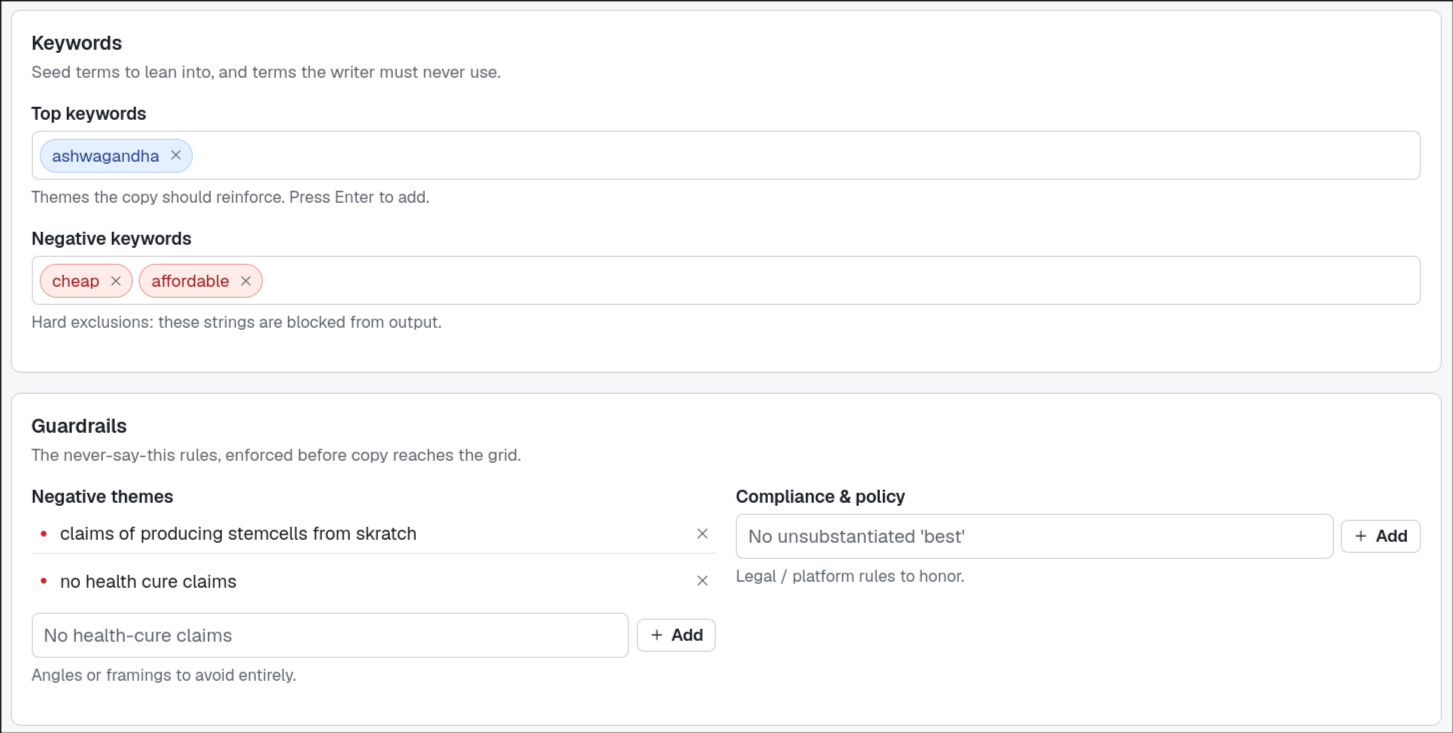
Each client's brand context comes built in.
Switch clients from the workspace switcher and the writer loads their voice, niche, keywords, negative themes, and compliance rules. The model generates within those rails instead of needing them re-explained on every prompt.
- Voice and tone, niche, and marketing angles
- Top keywords, negative keywords, negative themes
- Compliance rules and historical winning copy
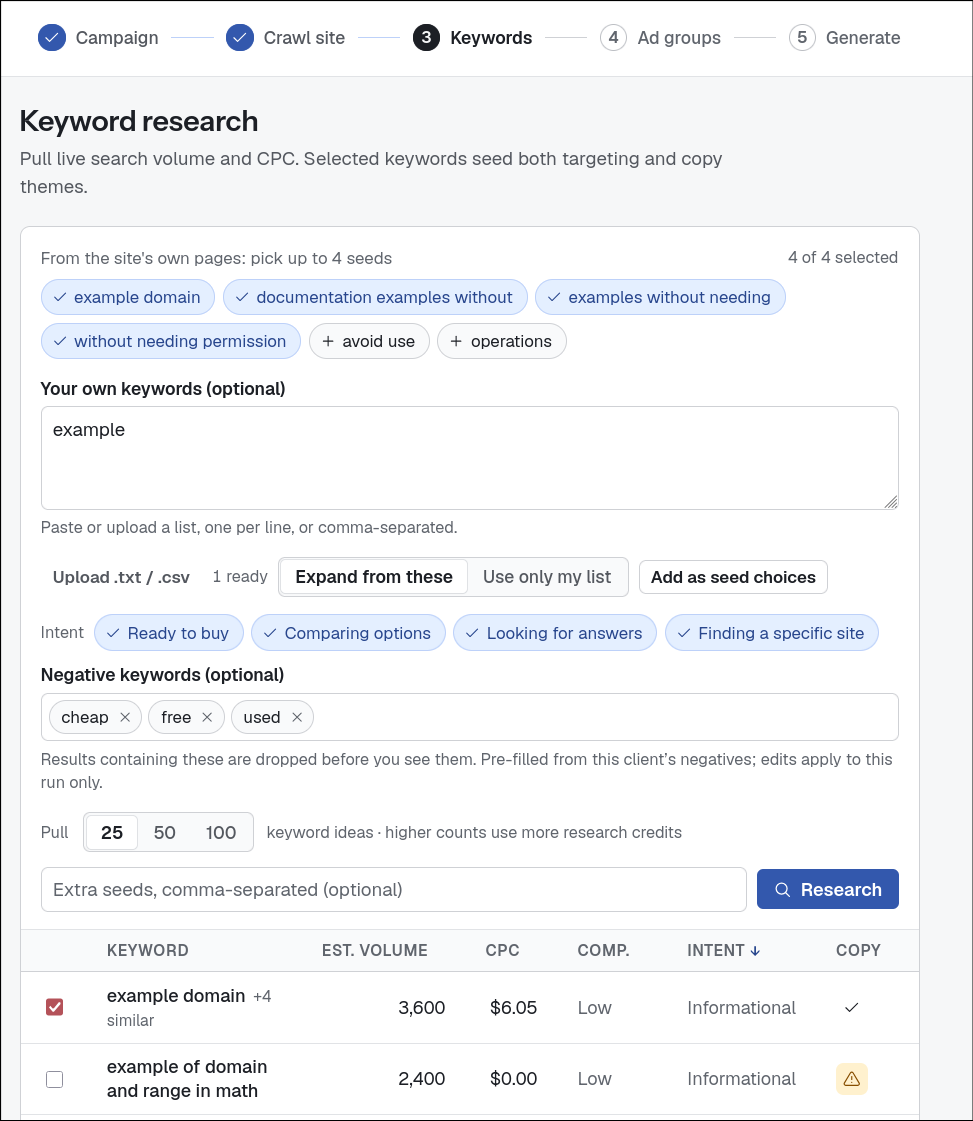
From a URL to ad groups, in a guided pass.
Start with campaign basics, crawl the client’s site to discover landing pages, then pull live keyword volume, CPC, and competition. Adgineer clusters them into ad groups and generates RSAs from there. No blank canvas.
- Site crawl surfaces real landing pages to target
- Live volume, CPC, and competition on every keyword
- Auto-clustered ad groups, ready to generate
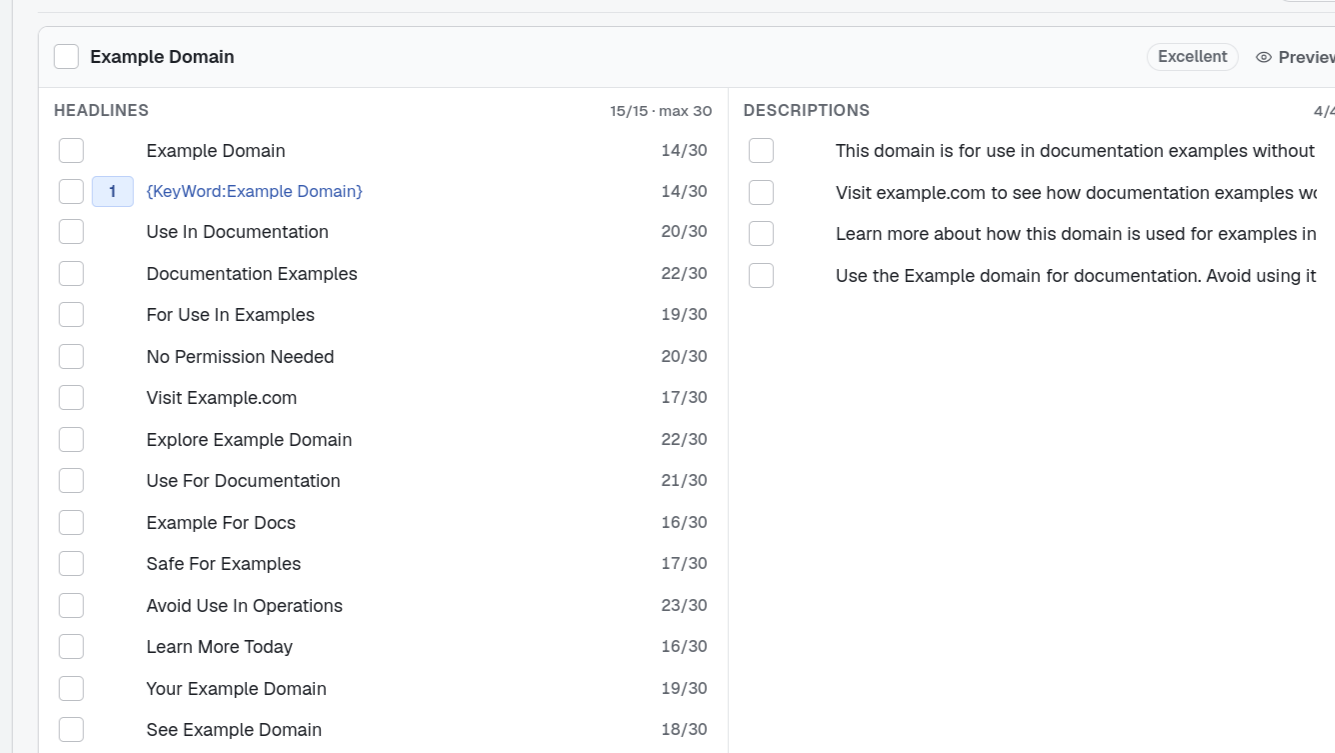
Policy and character limits, enforced on every generated line.
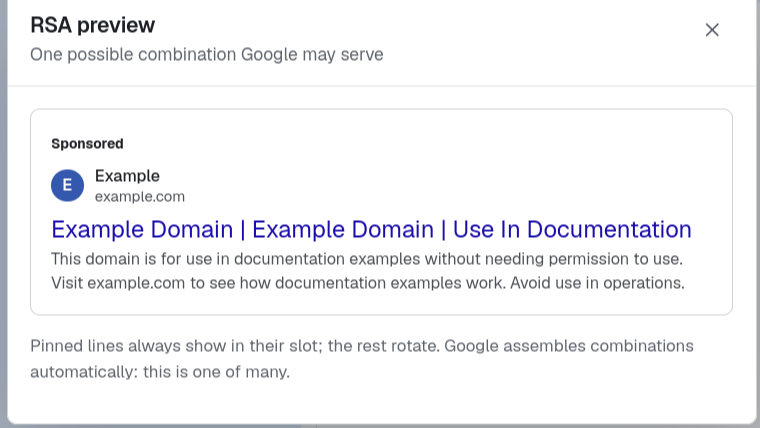
Fifteen headlines and four descriptions per RSA, with live 30/90 character counts, policy validation, pin positions, and Dynamic Keyword Insertion. A real-result preview tells you it’s shippable before you ever open Google Ads.
- Hard 30 / 90 character enforcement, never over
- Policy validation and pin positions inline
- Live RSA preview that renders like a real result
Copy straight into Google Ads Editor.
Generate and refine ads in the grid, then copy them into Google Ads Editor in one click or export a CSV for bulk import. Spinning up from a product feed? Import a GMC .tsv and generate RSAs per product.
- One-click Copy for Google Ads Editor
- Export a CSV for bulk import
- GMC feed import to generate RSAs per product
A chatbot is stateless and waits for instructions.
Generic AI writes plausible copy and leaves the rest to you: the limits, the policy, the brand, the structure. Adgineer treats those four as the starting constraints, so the first draft is already shippable.
You are its editor now.
- Paste the brand voice and banned words into every new prompt
- Count each headline to 30 by hand, cut a word, recount
- Catch the superlative and the policy trip it slipped in
- Reformat the chat log into ad groups before it reaches Editor
It writes in seconds. You spend the afternoon making it shippable.
It generates within the spec from line one.
- Brand voice, keywords, and guardrails loaded per client
- Character limits and policy enforced as it writes
- Organized account → campaign → ad group → ad
- Exports to Google Ads Editor by clipboard or CSV
The spec is the starting point, not your cleanup job.
Everything the ad copy job needs.
Spec-enforced as you type
Live 30/90 character counts and policy checks (negatives, superlatives, exclamations) run as the copy is written, so an RSA is valid before it reaches Google Ads.
Regenerate one line at a time
Rewrite a single weak headline or description in the grid. Keep the lines that work and refine the ones that don’t, without starting a new prompt.
Each client’s brand loads first
Voice, keywords, negative keywords, and compliance rules are pulled from the client’s workspace before generation, so the draft comes back on brand.
More than headlines
Generate the full asset suite: sitelinks, callouts, structured snippets, promotions, and display paths, each capped to Google’s exact character limits.
Preview the real search result
See your headlines and descriptions rendered as a live Google Search result, so you know how the combinations read before launch.
Export to Google Ads Editor
Copy straight to Editor in one click, or export a CSV for bulk import, when you’re ready to launch.
Built for agencies, not just advertisers.
Most AI ad tools assume a single advertiser. Adgineer is multi-client from the ground up, so a full roster stays organized, on-brand, and access-controlled.
A workspace per client
Each client keeps its own voice, keywords, negatives, and compliance rules. Switch clients and the writer loads that client’s context; nothing bleeds between accounts.
Room for the whole team
Editors do the work while clients and stakeholders follow along on free, read-only viewer seats, so everyone sees the copy without anyone stepping on it.
Scales with the roster
From 3 client workspaces on Solo to 30 on Agency, with seats to match. Add clients and teammates as the agency grows.
Pricing
Every plan starts with a 7-day free trial. Cancel anytime before it ends and you won’t be charged.
AI generation, keyword research, and one-click export for an independent freelancer.
- 3 client workspaces
- 1 seat
- One-click Copy for Google Ads Editor
- AI generation & bulk refinement
- Keyword research
- Website crawl bulk generation
- Winning-ads CSV import
Guided campaign builds and Google Merchant Center import for a growing agency.
- 15 client workspaces
- 3 seats
- Everything in Solo, plus:
- Guided builds: site crawl to finished campaign
- Google Merchant Center feed import
Double the roster with room for the whole team. Built for larger agencies.
- 30 client workspaces
- 10 seats
- Everything in Studio, plus:
- Unlimited read-only viewer seats for clients and stakeholders
Questions before you start.
Does Adgineer publish ads to Google automatically?
No. Nothing leaves Adgineer unless you send it. Copy into Google Ads Editor, export a CSV, or — if you’ve connected an account — confirm the specific change you want written back. There is no background job pushing copy to your accounts.
How do I get the ads into Google Ads?
Copy them straight into Google Ads Editor in one click, or export a CSV for bulk import. Prefer to keep Adgineer out of your account entirely? You never have to connect one — the grid and the export work on their own.
Can I connect my Google Ads account?
Optionally, yes. Connect through Google’s consent screen and Adgineer can pull your existing campaigns, ad groups, and ads into the grid so you’re editing the real account instead of retyping it. Writing anything back takes an explicit confirmation from you, every time, and you can disconnect whenever you like.
How does it keep ads within Google’s limits?
Character counts (30 / 90), policy checks, pin positions, and Dynamic Keyword Insertion are enforced live as copy is written, so RSAs are valid before they ever reach Google Ads, not after.
What does “brand context” actually include?
Per client: voice and tone, niche, top and negative keywords, negative themes, compliance rules, and your historical winning copy. The model generates inside those rails instead of needing them re-explained on every prompt.
Ship the next round of Google ad copy without endless rewrites.
Load a client’s brand context, generate your first spec-perfect RSAs in minutes, and copy them straight into Google Ads Editor. Start with a 7-day free trial.